Master Course in Distributed
Computing Systems Engineering
Workshop AW2
Module
EE 5029A
Object-Oriented
Systems Design
Assignment 2 – Part 2
Threads
Marc Höschele
Contents
1.1. Difference between Threads and
Processes
1.2. Why Java has Threads not Processes
2.2. Possible ways to create Threads
3.2. The synchronized Queue
implementation
3.3. Mutual excluded (monitored) Queue
access
4.2. Changes to the controllers
4.4. Things remaining the same
1. Introduction
Threads are a core functionality of modern GUI based applications. The user expects programs to work event-driven and parallel. This assignments describes the possibilities to implement Threads[1] in Java. Threads are only one possibility to run things in parallel. In Operating Systems, the CPU time is shared between processes. Each process[2] does represent one program or functionality.
1.1. Difference between Threads and Processes
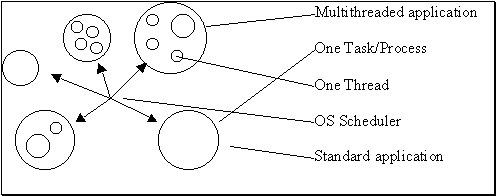
Figure 1 The difference between Processes and Threads
As shown in figure 1, a Thread is a “baby”-process within a Operating System process. Each Operating System process can have various numbers of Threads. It is also possible to write applications that run without parallelism or that use a number of processes to ensure parallelism.
1.2. Why Java has Threads not Processes
The Java Virtual Machine itself is a large process that receives time-slices from the OS scheduler. The time-slices for the Java Threads are maintained by the Java Virtual Machine, if Operating System does not support threads by itself.
In Java, there is a large number of possibilities to write and execute Threads. We will come to this later.
A core issue when working with Threads or Processes is the sharing of data between them. The synchronisation to ensure concurrent access does lead to data inconsistence. Semaphores and Monitors are a well-known utility to handle these concurrencies in data access to maintain the consistency. We will also come to this issue later.
The main reason to use Threads instead of processes to make a program run in parallel is the time necessary to switch between one and another instance. A task has a huge amount of data that has to be saved and restored for each switch. Threads are optimised to simple use as less as possible operations to store and restore a state.
2. Threads in Java
In Java it is not possible to start multiple Operating System processes, as Java is abstracted from the underlying Operating System implementation. To still enable parallelism in applications, the Java language offers a powerful internal support for Threads.
2.1. What is a Java Thread
A Thread in Java is simply a peace of Java bytecode that is executed in quasi-parallel time-slices provided by the runtime environment of Java. These time-slices can be seen as an equivalent to the Operating System time-slices provided by the scheduler – they do simply share the Java Virtual Machine time-slice given by the Operating System to the active Threads.
2.2. Possible ways to create Threads
To start a code in parallel, the class carrying the code has to implement the Interface Runnable. This interface provides a method public void run() that needs to be implemented. To start such a typed class implementing the Runnable interface, it need a wrapper around. This is the class Thread. A Thread class object is supported by the Java Virtual Machine to be started in quasi-parallel.
Using the class Thread it is possible to enable every class implementing the interface Runnable to run as a Thread.
public void MyThread implements Runnable {
public void run() {
while (true)
System.out.println(“Hello
again!”);
}
}
To start sucha class as a Thread, a new instance of the class Thread is used to wrap this class (which by itself does implement the interface Runnable also).
Thread myThread = new Thread(new MyThread());
Now we have a runnable object of the Thread – to start it, it needs to come into the ready-to-run state (see 2.3). This is done using the native method start() in Thread which invokes the creation of a new thread in the Java Virtual Machine environment (Some UNIX implementations might also use System tasks).
The Java Virtual Machine Scheduler does the necessary step from ready-to-run to running by itself after start() is executed.
myThread.start();
It is also possible to create a Thread without explicitly using the Runnable interface. The Thread itself implements the Runnable interface, too. Knowing this, the following possibilities to create a Thread exist:
Thread a = new Thread() {
public void run() {
while (true)
System.out.println(“Works,
too”);
}
};
Runnable b = new Runnable() {
public void run() {
while (true)
System.out.println(“This
is interesting!”);
}
};
MyThread extends Thread() {
public void run() {
while (true)
System.out.println(“This
is interesting!”);
}
}
a.start();
new Thread(b).start();
MyThread c = new MyThread();
c.start();
This code shows the various ways to create a parallel running thread. Object ‘a’ is a anonymous class extending Thread. Because Thread implements Runnable, it can be started using a.start().
The object ‘b’ is an anonymous class implementing the Runnable interface. It is executed in a wrapper Thread object using start(), too.
The class MyClass also extends Thread, but this time it is not done using an anonymous class. It could also be a class implementing Runnable and finally wrapping the class into a Thread object to start it.
2.3. The Thread state chart
The following figure will show the different possible states of a Thread[1]:
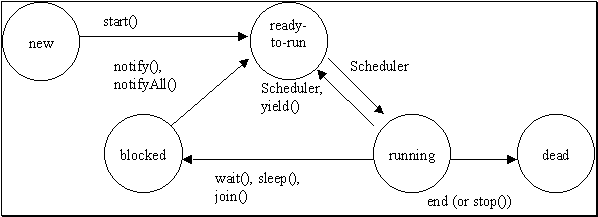
Figure 2 The different states and transitions between these states
In figure 2, the method stop() is not shown. It is deprecated and should not be used any more. The method stop() of a Thread would take the state of the Thread to the dead state.
Two things we have not yet implicitly talked about – there is a blocked state. This state happens to a Thread if it is blocked because of a monitored access using wait() (see chapter 3) or because of a sleep() or join() call. It need external action to get a Thread state blocked back to the ready-to-run state. A monitored area has to leave the monitor with notify, a monitored Thread has to go to the dead state or the timer started by sleep() has to end.
To manually invoke a transition from running to ready-to-run the method yield() exists. This is usually done be the Scheduler, but can be used by a Thread to give other Threads a chance to use CPU-time.
yield() Release the (virtual) CPU and transition to ready-to-run state
sleep() Transition to blocked state and a pause for a given time in milliseconds until the state will change back from blocked to ready-to-run again
wait() Blocked state until notified – this is the monitor concept implementation in Java. See chapter 3.
notify() Transition from blocked state to ready-to-run state for a waiting Thread – this is the monitor concept implementation in Java. See chapter 3.
3. Mutual exclusion in Java
To ensure consistent data while working in parallel, it is necessary to ensure mutual exclusion between accesses to the same data from different Threads. The first issues have already been mentioned in chapter 2, the wait() and notify() functionality.
If several threads running at the same time try to access the same data, it is crucial to ensure that the access to this data is handled in a way, that only one thread at a time is accessing the data. This is named mutual exclusion.
3.1. The monitor concept
The Java class Object implements the monitor concept (as native implementation). Each area of the code which should be monitored must be enclosed within a synchronized block statement. Because all objects in Java derive from Object, the monitor concept is available to any code segment in any Java class.
The monitored area must be enclosed into a synchronized block.
public void run() {
… // some unsynchronized code
working on non-shared data
synchronized(this) {
// Do access that needs to
work on shared data
}
… // some unsynchronized code working
on non-shared data
}
In Java it is also possible to make complete methods monitored – this is simply done adding the key-word synchronized to the method header.
public synchronized void run() {
// Do access that needs to work on
shared data
}
This is equal to an encapsulation of the whole methods code segment into a synchronized block statement:
public void run {
synchronized(this) {
// Do access that needs to
work on shared data
}
}
3.2. The synchronized Queue implementation
The monitor concept was used to implement the queue for the intro scan in the radio. The following code fragments show the store and the retrieve methods in the Queue class.
/** store values in the queue */
public synchronized void store(float channel) {
try {
if (index == (LENGTH - 1))
wait();
} catch(InterruptedException ie) {
}
queue[index] = channel;
index++;
notify();
}
The retrieve method.
/** retrieve values from the queue */
public synchronized float retrieve() {
try {
// if queue empty, wait
if (index == 0) {
wait();
}
} catch(InterruptedException ie) {
}
float ret = queue[0];
// Move values down one step
index--;
for (int i = 0; i < index; i++)
{
queue[i] = queue[i + 1];
}
// let the writing part go on...
notify();
return ret;
}
3.3. Mutual excluded (monitored) Queue access
The store() method enters the synchronized area and checks if the queue is full. If it isn’t and no other Thread is accessing the object at the same time, an entry is stored into the queue. After it is stored, a possibly waiting retrieve() is notified by calling notify(). If it is full, the store() method is blocked after calling wait().
The retrieve() method enters the synchronized area and checks if the queue is not empty. If it isn’t and no other Thread is accessing the object at the same time, an entry is retrieved from the queue. After it is stored, the queues first entry is retrieved and all following entries are reordered. The queue is now read and the store() method is notified by calling notify(). If it is empty, the retrieve() method is blocked after calling wait().
The mutual exclusion itself is ensured with the synchronized statement, which ensures that only one method in the Queue object is executed at a time.
The following figure shows exactly what happens if the queue is filled and read at the same time. The demonstration assumes a queue size of 5 elements and a store frequency which is higher than the read frequency. Thus the queue fill be filled up after a small number of steps to show that the mutual exclusion is working properly.
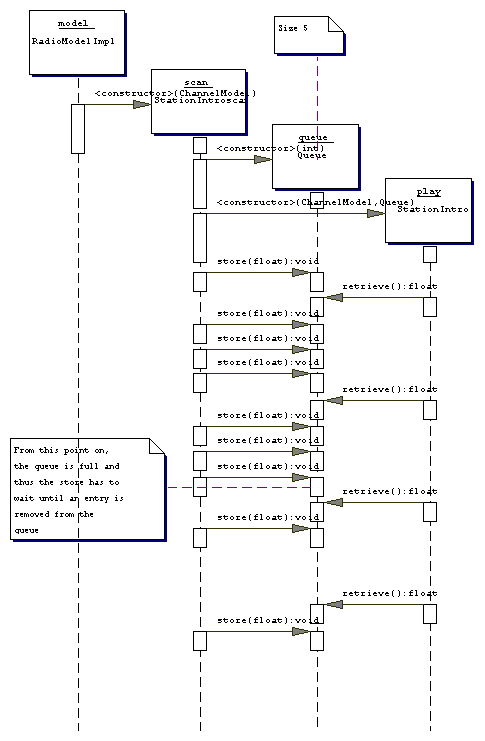
Figure 3 The concurrent access to the same data using monitors to ensure mutual exclusion
The diagram in figure 3 shows that the access has mutual exclusion. If the read and write would be possible at the same time, the second, fifth and eighth store would not wait until the retrieve would have been finished. The scan object which has called the store method is blocked for that time.
The queue ensures that only an allowed number of entries will be stored into the queue secured by the wait() and notify() methods. This is necessary for the radio simulator, if the station scan is faster than the station intro play and the queue size is limited.
4. Design changes
To provide the requested functionality of the radio simulator, the following design changes have been applied:
- The memory button view has now another hierarchy – it does no longer inherit from BorderedView as in the first implementation.
- The VolumeView and ChannelView have not changed – they simply are both added to the RadioView. The difference is, that they are added to the same position and only one of both is visible at one time.
- An additional Thread has been added to the controllers to enable the time-based switch between channel and volume display.
- A synchronized queue has been added to handle the concurrent access of the intro scanner and the tuner
- Another Thread has been added to invoke the channel intro scan and the storage into the small queue.
- A third Thread has been added to retrieve one of the found channels from the queue every 10 seconds.
- Some minor changes have been made to the class names. They are now more constant throughout the design.
- The NavigationView has now a new button, the “Scan” button to invoke the intro scan.
- The ChannelModel interface as well as the implementation of this interface has been extended by a scanChannels() method.
- RadioModelImpl class has changes to the following methods: incChannel(), decChannel() and the necessary new method scanChannels() from the changed interface ChannelModel.
- The StationSkip method has moved from the model package to the controller package.
- The RadioView initView() method was changed to add the views as requested. It has two additional methods: showVolume() and showChannel(), which are used to switch the channel view and the volume view.
4.1. Changes to the view
The major changes have taken place in the RadioView. The initView() method was almost rewritten to conform to the new design. A new attribute has been added: ShowVolume showVolume. This is a reference to the Thread that will switch to VolumeView for two seconds after the volume is changed by the model.
4.2. Changes to the controllers
The ShowVolume thread can be invoked numberless times. It does ensure not to switch back the display to early after the 2 seconds of the first click are over:
/** The method to switch on and off the Volume view */
public void run() {
view.getVolumeView().setVisible(true);
view.getChannelView().setVisible(false);
try {
sleep(2000);
} catch (InterruptedException ie) {
}
if (!againPressed) {
view.getChannelView().setVisible(true);
view.getVolumeView().setVisible(false);
}
view = null;
}
When the method againPressed() is called by the VolumeController, the change will not be executed and thus the view will remain showing the volume until the 2 seconds of the last ShowVolume thread invoked by the updateVolume() method in the VolumeView has finished:
/** This method is called from the model if
the volume changes. */
public void updateVolume(int volume, boolean mute) {
if (!mute) {
if ((show != null) &&
show.isAlive()) {
show.againPressed();
}
show = new ShowVolume(this);
show.start();
}
}
4.3. Changes to the model
The changes to the RadioModelImpl are only of minor nature. The new method scanChannels() creates a new Thread StationIntroScan which handles the intro scan functionality. The methods incChannel() and decChannel() have been changed so that either the StationSkip Thread can run or the StationIntroScan Thread.
/** Decrement channel */
public synchronized void decChannel() {
if (((scan == null) ||
(!scan.isAlive())) &&
((search == null) || ((search
!= null) && (!search.isAlive())))) {
search = null;
search = new
StationSkip(this, -0.1F);
search.start();
}
}
/** Increment channel */
public synchronized void incChannel() {
if (((scan == null) ||
(!scan.isAlive())) &&
((search == null) || ((search
!= null) && (!search.isAlive())))) {
search = null;
search = new
StationSkip(this, +0.1F);
search.start();
}
}
/** Scan channels */
public void scanChannels() {
if (((search == null) ||
(!search.isAlive())) &&
((scan == null) || ((scan !=
null) && !(scan.isAlive())))) {
scan = null;
scan = new
StationIntroscan(this);
scan.start();
}
}
4.4. Things remaining the same
The following diagrams show the new design, which does only differ in the above mentioned cases from the original implementation.
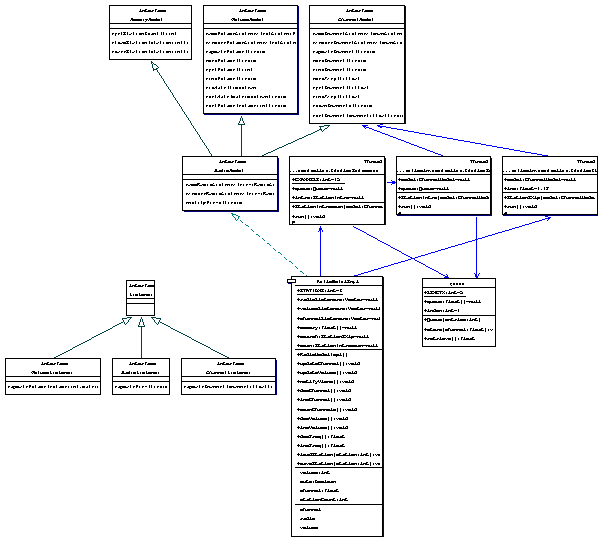
Figure 4 The new de.mhoesch.radiosim.model package class diagram
The model package has now a new class Queue, which represents the limited memory available for prescanned stations.
The changes to the controllers are a new class StationIntroScan and StationIntro. They are both also shown above in the model, to show the used dependencies.
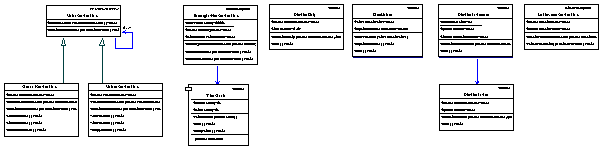
Figure 5 The new de.mhoesch.radiosim.controller package class diagram
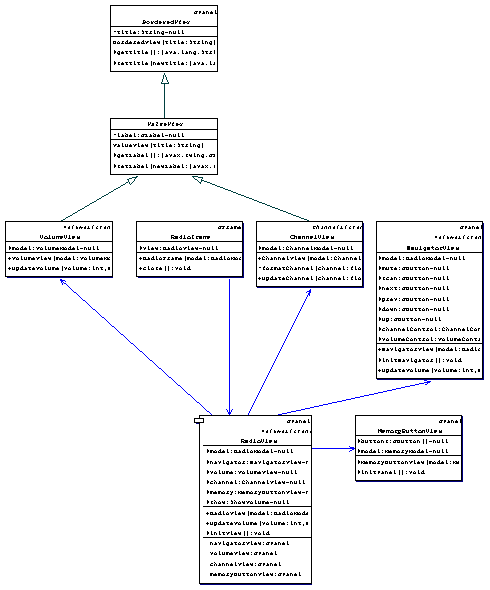
Figure 6 The new de.mhoesch.radiosim.view package class diagram
In the view, there is a change to a more simple design. The main change is the new MemoryButtonView, which is used as a replacement for the formerly separated views to load and store stations. The rest of the application remains unchanged (only some name changes have occurred).
5. Conclusions
Threads in Java are very simple to implement. One important issue which makes an implementation more difficult is the concurrent access to the same data. Using monitored access with synchronized code segments offers an easy to use and implement solution to the problem of concurrent access.
Java has various ways to implement Threads and offers a simple to use monitor concept to deal with mutual exclusion and shared access to the same code segment.
The changes to the first implementation of the radio simulator were very easy and not much of the source had to be changed. Thanks to the separation of the model, the view and the controller it was only necessary to change small areas of code to conform to the new requirements.
I have changed the naming and placement of some classes to better represent the design patterns used. The names are now more conform throughout the implementation.
[1] Joachim
Goll, Cornelia Weiß, Peter Rothländer. “Java als erste Programmiersprache –
Java 2 Plattform”
B. G. Teubner Stuttgart, 1999