Master Course in Distributed
Computing Systems Engineering
Workshop AW2
Module
EE 5029A
Object-Oriented
Systems Design
Assignment 3
Sockets
and Remote Method Invocation
Marc Höschele
Contents
2.1.3. Creating an HTTP server in Java
2.1.4. Making the HTTP server
multithreaded
2.3.1. Using multicast services
3. Remote Method Invocation (RMI)
3.1.3. Calling methods on remote objects
4. Refactoring existent applications
4.1. Creating a distributable radio
simulator
4.1.4. Distribution on three different
computers
4.2. Conclusion on distributed applications
1. Introduction
Distributed object technologies do not stand-alone; instead, they depend on a set of related technologies that provide important services and facilities. It is not possible to understand these distributed object technologies without a solid understanding of networks, sockets and remote method calls (or invocation for Java). The purpose of this report is to show that these important technologies are understood.
Section 2 will show how the IP[1] protocol is working and which different kinds of connections are possible. It introduces the basic terms and concepts of TCP/IP networking. The more sophisticated issues in this section are the usage of these kindly simple protocol methods to implement complex services for distributed computing, such as a multithreaded web server or a lookup service.
Section 3 will show how Java can be used to built distributed applications using remote method invocation and object serialisation. A simple Java object server will be described. The goal of this section is to show the simplicity of remote applications using the abstractions offered by Java.
Section 4 uses the results of section 3 to refactor the radio simulator introduced in [2] and [3] as a fully distributable MVC[2] application. The remote radio application and its distribution will be shown.
Finally all sections will be summarized.
2. IP Sockets
The nowadays Internet is based on one protocol – the Internet Protocol (IP). Before looking into the protocol itself, a few terms need to be explained. For computer networks, there are basically two different connection types – connection oriented and connection less.
IP offers services for both connection types – TCP for connection oriented connections and UDP for connection less.
2.1. TCP over IP
Connection oriented services are simply describable as telephone connections – if a connection between two telephones is established, both sides can talk and listen whenever they want. Unless none of the two will cancel the connection by hanging up the phone, the connection will stay connected.
While IP offers services for connection oriented and connection less links, the underlying network protocols most probably won’t, thus every connections oriented link is converted into a connection less link. This is done completely transparent to the use of the connection oriented TCP/IP[3] service.
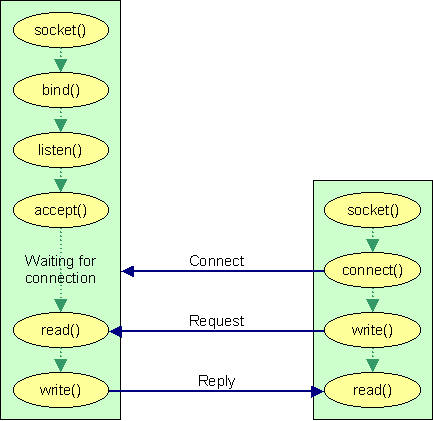
Figure 1 Connection establishment and communication using TCP
2.1.1. Socket establishment
To establish a TCP server service on a socket, the following steps are necessary: The socket has to be generated and the service routine has to be bound to the socket. After a service routine is bound to a socket, the IP protocol stack starts to listen to connections on this given socket.
The TCP service routine has to accept eventually incoming connections to establish a connection between two computers. After the connection has been established, both sides of the connection can start to communicate by writing and reading data from the socket. TCP does not provide any handshake or transmission protocol for data exchange over an established connection – this is the task of the applications itself.
2.1.2. TCP in Java
In Java TCP/IP is used with the Socket and ServerSocket classes. The ServerSocket object has to be created giving a port number.
ServerSocket server = new ServerSocket(int port);
The constructor of the ServerSocket will process all steps up to the listening task in figure 1.
To establish a connection with an incoming connection request, the server service routine has to call
Socket client = server.accept();
To disconnect an established connection, the socket must be closed. In Java this can be done using
server.close();
Or, if the connection should be closed from the client side the streams can be closed:
inputstream.close();
outputstream.close();
If the other side of the socket will try to write more data into the socket, it will get an IOException as a result.
2.1.3. Creating an HTTP server in Java
An HTTP[4] web server is a simple socket server receiving HTTP request and answering them. The HTTP request header simply looks the following way and is followed by one empty line to signal the end of the request block:
The HTTP server responds to such a request with the following response header and data:
HTTP/<version> <server status>
<server message>
Content-Length: <length>
Content-Type: <mimetype>
<data>
The server request handler could look like the following:
Socket client = server.accept();
String filename = parseHttpRequest(client.getInputStream());
protected String parseHttpRequest(InputStream
inStream) throws IOException {
// parsing the HTTP request for the
requested filename
}
After the requested filename, possibly an HTML document, is retrieved, the server reads this file from the document base and returns the content in an HTTP response message:
protected void
sendHttpResponse(OutputStream outStream, String strPath) throws IOException {
// some code
try {
// some code
while ((line =
bufreader.readLine()) != null) { content.append(line);}
header = "HTTP/1.1 200
OK\nContent-Length: " + content.length() + "\n"
"Content-Type: TEXT/HTML";
} catch(IOException ioe) {
header = "HTTP/1.1 404
File not found";
content.append("<html><h1>404
File not found</h1></html>\n");
}
// some code
writer.write(header +
"\n\n" + content); writer.flush(); writer.close();
}
The problem with this server is, that it can only handle one HTTP request at a time – for a world-wide accessible service not acceptable.
2.1.4. Making the HTTP server multithreaded
To enable multiple connections to a server, it is necessary to accept multiple connections using multiple sockets. The accept() must be done on a continuous base and the created connection must use ports different from the web server port. A new Thread must be created to process each individual request, thus the server class must be a Java Thread or Runnable. The code to accept the request and create the necessary multiple Threads for the response is shown below.
try {
ServerSocket serverSocket = new
ServerSocket(80);
while(true) {
System.out.println("listening
...");
Socket socket =
serverSocket.accept();
System.out.println("accepted
connection !");
(new
MultithreadedHttpServer(socket)).start();
}
} catch(IOException e) { }
Now a new thread processes each request. The result is a new socket connection for each request on various ports.
2.2. UDP
Connection-less services are comparable to the mail system. If two parties want to communicate, one initiates the communication by sending a letter to the other – after possibly (but not necessarily) receiving the mail, the receiver answers the letter and by doing that acknowledges the arrival of the letter.
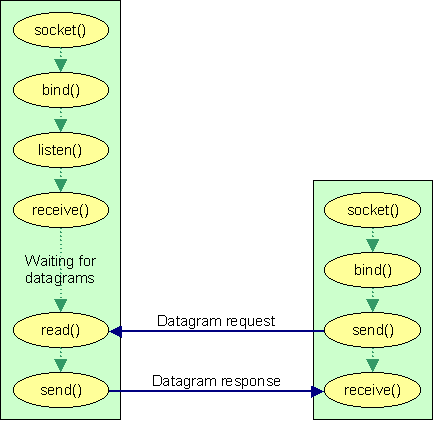
Figure 2 UDP communication – no connections are established
2.2.1. UDP communication
UDP[5] uses datagrams to communicate between different entities. Aside from the multiplexing/demultiplexing functionality for larger datagram packages and some light error checking, UDP adds nothing to IP. Thus the communication over UDP is faster and has less protocol and implementation overhead as TCP has.
2.2.2. UDP in Java
UDP is much simpler than TCP, as it is not necessary to establish a connection. To send a UDP package to another computer, the following code does the job:
byte[] buf = “UDP message”.getBytes();
DatagramSocket client = new DatagramSocket();
DatagramPacket packet = new Datagrampacket(buf, buf.length, serverAddress,
port);
client.send(packet);
The server that listens to such packages is also quite simple. It opens a datagram socket and receives package sent into a datagram object.
DatagramSocket server = new
DatagramSocket(int serverPort);
DatagramPacket packet = new DatagramPacket(buf, buf.length);
server.receive(packet);
The received package has the sender address, the sender port and the sent data available for further processing:
InetAddress clientAddress =
packet.getAddress();
int port = packet.getPort();
byte[] buf = new byte[packet.getLength()];
buf = packet.getData();
UDP does not offer any services to deal with segmentation and error checking. This has to be implemented by the application.
packet.setData(buf);
packet.setOffset(start);
packet.setLength(buf.length);
client.send(packet);
byte[] buf = new byte[1000000];
// some code for server setup, while loop etc…
server.receive(packet);
System.arraycopy(packet.getData(), 0, buf, packet.getOffset(),
packet.getLength());
// go on, until all parts are received
For the segmentation, Java offers the offset attribute in the DatagramPacket class. Using this information, the reordering of non-sequentially received packages can be done by an application without using bytes in the data area of a packet.
2.3. Multicast
The Multicast functionality of IP is an interesting method to support lookup services. A multicast socket server is bound to one of the special IP addresses in the range of 224.0.0.0 to 239.255.255.255. The address range from 224.0.0.0 to 224.0.0.255 should not be used, as it is reserved for multicast routing information.
2.3.1. Using multicast services
Multiple servers can bind to one of these multicast addresses – they form a multicast group. The first server receiving a request responds to the request. A client using a multicast service does not know which server will process its request. The client simple uses the multicast group address as the target address and sends datagrams to this multicast address.
2.3.2. Multicast in Java
To set up a Multicast server in Java the MulticastSocket class exists. The multicast server has to be set up and it has to join a group of multicast server. This is necessary, because the IP-address of the used network card is not a multicast socket.
MulticastSocket server = new
MulticastSocket(port);
server.joinGroup(mulicastAddress);
After at least one such server is set up, a client can send datagram packages addressed to such a service by addressing the multicast socket.
DatagramPacket packet = new
DatagramPacket(buf, buf.length, multicastAdress, port);
MulticastSocket client = new MulticastSocket();
client.joinGroup(multicastAddress);
client.send(package, (byte) maxHops);
client.leaveGroup(multicastAddress);
The maxHops used to send the package defines the maximum number of routers to be passed until the package will be invalid and the package is discarded.
The rest of the implementation of a multicast service in Java is the same as for the UDP implementation.
2.4. Conclusion on IP Sockets
IP is a simple but powerful protocol to enable communication between computers over network connections. Using sophisticated technologies like multithreading, it is possible to create powerful services with only a few lines of code.
IP UDP is a very fast protocol offering connection less communication without much overhead. UDP is thus fast but unreliable. It does not offer services like error correction or delivery acknowledgements.
TCP/IP is a more complex and powerful protocol offering connection-oriented services with error correction and data acknowledgements.
IP Multicast supports the development of lookup services. A service can be published by a number of computers. As all these computers can bind to the same multicast address, it is possible to create failure save services.
3. Remote Method Invocation (RMI)
A more sophisticated usage of the IP protocol is the usage as a protocol to enable distributed computing. The idea behind RMI is to be able to work with objects in different virtual machines or even different computers that are connected by a network.
The RMI protocol is an enhanced Object-Oriented implementation of RPC[6] calls used in Java. It uses the IP protocol to transfer the necessary information between two objects so that they can work together like being in the same virtual machine. This can be used to create multi-tier applications.
3.1. Creating remote objects
To create objects that can be accessed through different virtual machines, these objects have to extend the UnicastRemoteObject class and the remotely accessible methods must be defined in an interface that extends the Remote interface. Each remotely accessible method can throw a RemoteException, if something during the IP communication fails.
public interface MyService extends Remote {
public MyObject myService(MyObject
o) throws RemoteException;
}
public class MyServiceImpl extends
UnicastRemoteObject implements MyService {
public MyObject myService(MyObject
o) throws RemoteException {
// the service code
}
}
If a method is defined that uses references to objects, it is necessary that this object is serializeable. In the above example the MyObject must have a class header like the following:
public class MyObject implements
Serializeable {
}
3.1.1. Marshalling
This is necessary, as the reference to such an object is not available in another virtual machine. To deal with this issue, the RMI environment marshals (serializes) the object over the network and reassembles it on the other side. This newly established objects reference is then used for the method call.
3.1.2. Stubs and skeletons
As the MyServiceImpl does not do the marshalling, it is clear that the functionality must be available in another class. Basically all remote servers have skeletons and stubs that handle the marshalling and unmarshalling of objects before methods in the MyServiceImpl class on the server virtual machine are called.
The stub handles the marshalling of objects from the client to the server virtual machine and the unmarshalling of objects from the server virtual machine back to the client. The skeleton handles the unmarshalling of objects from the client and marshals answers from the server back to the client.
Since Java 2 the creation of skeleton classes is no longer necessary, as this functionality is handled by using the Java Reflection API[7].
3.1.3. Calling methods on remote objects
To call methods in another virtual machine, it is necessary to start the RMI registry, a naming lookup service for remote server references. Clients use this service in order to bind with remote object references addressed by name. For codebase and connection security reasons, an RMISecurityManager has to be set (see 3.1.4).
System.setSecurityManager(new
RMISecurityManager());
MyService rmiMyService = (MyService) Naming.lookup(“rmi:///MyService”);
A server has to make itself known to the registry by binding a name to its remote reference. An RMI security manager has to be set, so that the server can access objects from another codebase (see 3.1.4).
public MyService throws RemoteException {
super();
try {
System.setSecurityManager(new
RMISecurityManager());
Naming.bind(“rmi:///MyService”,
this);
} catch(MalformedUrlException mue)
{ }
}
After the client has looked up such a server remote reference, it can call the service of this server by simply using the server reference like a local reference – the only difference is that all methods that such a remote reference has, can throw a RemoteException.
try {
MyObject o = rmiMyService.myService(new
MyObject());
} catch(RemoteException re) { };
The complete process of marshalling the newly created MyObject to the server, the unmarshalling on the server side and the marshalling/unmarshalling of the return value to the client side are processed transparently to the method call.
3.1.4. Command line options
As the RMI registry does not have any class of the transferred ones in its classpath and a client should not have the server implementation and stub class in its classpath, it is necessary to transfer them from another codebase. This ensures that the server implementation can be changed without redistributing the software to all the clients.
Therefore the codebase for the necessary implementation and stub class needs to be set to a central instance such as a web server.
java
–Djava.rmi.codebase=http://192.168.17.23/stubs/
-Djava.security.policy=http:/192.168.17.23/policy.all
de.mhoesch.rmi.Server
The java.rmi.server.codebase setting is used to provide the location of these classes for dynamic download and usage.
The java.security.policy setting is necessary to enable the client to connect to other computers and to access objects from another codebase. The restrictions in such a policy file can be set with the policytool from the JDK.
3.2. Conclusion on RMI
RMI is a powerful and easy to use technology to distribute Java to different virtual machines or computers. One bigger problem of RMI is, that it is only available in Java – thus client and server need to be implemented in Java. For projects that are only Java based this is not an issue, but for heterogeneous environments, this permits RMI from being used.
The basic handling of remote object references and calls is comparable to other technologies such as CORBA[8], but simpler. Using RMI, it makes no difference to use locally available references or remote references. The difference in the usage of remote objects is that they can throw a RemoteException is something during the network connection and data exchange went wrong.
For projects asking for heterogeneous language support, RMI is not usable, but for all others, even for heterogeneous computer platforms in one network, RMI seems to be the cheapest and easiest solution.
4. Refactoring existent applications
To distribute an existent application, it is first necessary to ensure that an application can be divided into several logical modules. If an application is already designed to be modular and most preferable being designed using the MVC pattern, it is only necessary to change the applications interfaces between the different modules to be remotely accessible.
4.1. Creating a distributable radio simulator
For the radio simulator application introduced in [2] and [3], it was not necessary to refactor and redesign the application, as the MVC [1] pattern was already used. All classes were implemented using an interface as an abstraction to their functionality.
The necessary changes were to change every interface to extend the Remote interface and to change every implementing class to extend the UnicastRemoteObject. If a class had already a base class, it was necessary to use the UnicastRemoteObject.exportObject() method.
Additional start classes had to be implemented and the old start class Radio had to be modified to bind the model to the RMI registry. The new start classes StartRadioController and StartRadioView take care of getting the RMI reference of the model. The views take care of registering their own servers for the listener interfaces to changes in the model (see diagrams of the packages later).
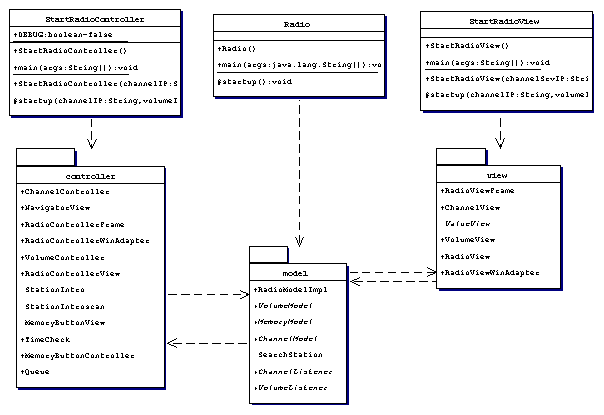
Figure 3 The packaging of the radio simulator application
As it can be seen in the figure above, the model, view and controller were not only separated in the usage, they were also placed into separate packages.
4.1.1. The Model
The model consists of the following classes: RadioModelImpl, the SearchStation to support the parallelism of changing the channel and still handling user requests and the interfaces for accesses to the model.
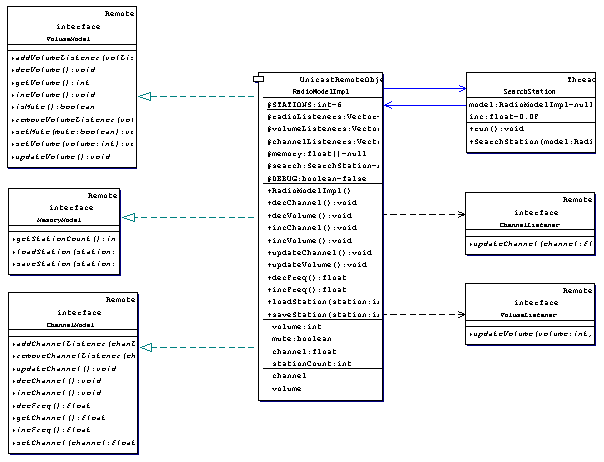
Figure 4 The radio model package
The radio model implements three Remote interfaces, VolumeModel, MemoryModel and ChannelModel. This supports a later distribution of the model to more than one server. The ChannelModel and VolumeModel support the connection of Listeners to the values in the Model, provided through the ChannelListener and VolumeListener interfaces. Both must extend Remote, so that they can be placed into another virtual machine or another computer.
The view has only one stub, the RadioModelImpl_Stub, but it exports three different remote services within this stub, the MemoryModel, VolumeModel and ChannelModel and thus it exports three different servers (rmi://<host>/ChannelModel, rmi://<host>/VolumeModel and rmi://<host>/MemoryModel) for later scalability without having to change everything in the controller and the view.
4.1.2. The Controller
The controller has all user-controls of the radio included and implements a server for listening to volume changes, as the “Mute” button will change its presentation with the volume status of the model.
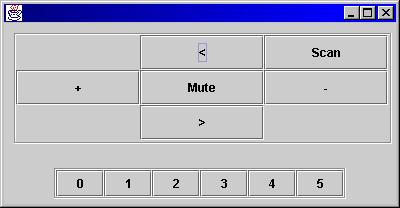
Figure 5 The controller view
The controller package implements the following classes: The MemoryButtonView for stored radio stations, the NavigatorView (which is the 3x3 view shown above) and a necessary container-object, RadioControllerView with RadioViewFrame and WindowAdapter.
The mute button changes its content to “Sound”, if the VolumeModel is switched to mute – and thus has to be registered in the RMI registry, that the model can notify the button of changes. Therefore the NavigatorView_Stub has to exist and the NavigatorView has to extend Remote (to be exported to the RMI registry).
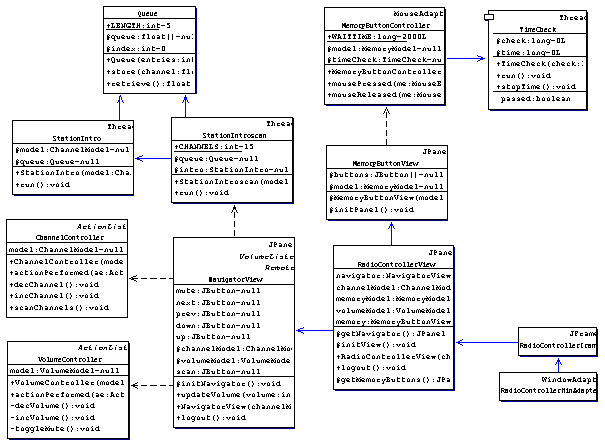
Figure 6 The controller package
The set-up of the RMI server (for the mute button) is done in the constructor of the NavigatorView using the UniCastRemoteObject.exportObject() functionality, which does not require the server to derive from UniCastRemoteObject.
To do a clean disconnection from the model, the WindowAdapter of the used frame calls logout on the RadioControllerView class, which redirects the logout call to the buttons and the navigator. This takes care of a clean deregistration from the remote model and the NavigatorView-Object is un-exported from the RMI registry, as well.
4.1.3. The View
The view is simply the display of the available information from the model, volume and the frequency.
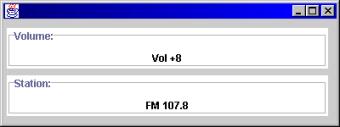
Figure 7 One possible implementation of a view
The view package consists of the following two displays, the VolumeView and the ChannelView. Both are kept separate and could also be used on different virtual machines or computers.
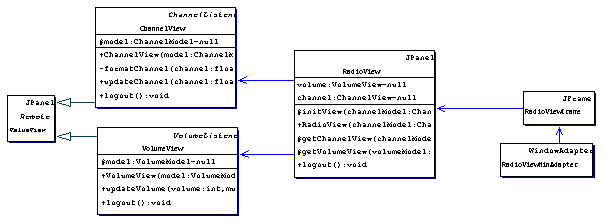
Figure 8 The view package
Both, ChannelView and VolumeView must receive notifications from the model and thus have to extend Remote and export themselves to the RMI registry. This results in two stubs, ChannelView_Stub and VolumeView_Stub. They are both exported to the RMI registry using the UniCastRemoteObject.exportObject() functionality.
If the frame is closed, the attached WindowAdapter invokes logout() on the RadioView, which delegates the logout() call to the ChannelView and the VolumeView. They both un-export their RMI reference and deregister from the model before the application is closed.
4.1.4. Distribution on three different computers
This design can be distributed to three different computers with the following minimum packaging per component:
4.1.4.1.
Model
de.mhoesch.radiosim.Radio.class
de.mhoesch.radiosim.model.ChannelListener.class
de.mhoesch.radiosim.model.ChannelModel.class
de.mhoesch.radiosim.model.MemoryModel.class
de.mhoesch.radiosim.model.RadioModelImpl$1.class
de.mhoesch.radiosim.model.RadioModelImpl.class
de.mhoesch.radiosim.model.RadioModelImpl_Stub.class
de.mhoesch.radiosim.model.SearchStation.class
de.mhoesch.radiosim.model.VolumeListener.class
de.mhoesch.radiosim.model.VolumeModel.class
4.1.4.2.
Controller
de.mhoesch.radiosim.StartRadioController.class
de.mhoesch.radiosim.controller.ChannelController.class
de.mhoesch.radiosim.controller.MemoryButtonController.class
de.mhoesch.radiosim.controller.MemoryButtonView.class
de.mhoesch.radiosim.controller.NavigatorView.class
de.mhoesch.radiosim.controller.NavigatorView_Stub.class
de.mhoesch.radiosim.controller.Queue.class
de.mhoesch.radiosim.controller.RadioControllerFrame.class
de.mhoesch.radiosim.controller.RadioControllerView.class
de.mhoesch.radiosim.controller.RadioControllerWinAdapter.class
de.mhoesch.radiosim.controller.StationIntro.class
de.mhoesch.radiosim.controller.StationIntroScan.class
de.mhoesch.radiosim.controller.TimeCheck.class
de.mhoesch.radiosim.controller.VolumeController.class
de.mhoesch.radiosim.model.ChannelListener.class
de.mhoesch.radiosim.model.VolumeListener.class
de.mhoesch.radiosim.model.MemoryModel.class
de.mhoesch.radiosim.model.VolumeModel.class
de.mhoesch.radiosim.model.ChannelModel.class
4.1.4.3.
View
de.mhoesch.radiosim.StartRadioView.class
de.mhoesch.radiosim.view.ChannelView.class
de.mhoesch.radiosim.view.ChannelView_Stub.class
de.mhoesch.radiosim.view.RadioView.class
de.mhoesch.radiosim.view.RadioViewFrame.class
de.mhoesch.radiosim.view.RadioViewWinAdapter.class
de.mhoesch.radiosim.view.ValueView.class
de.mhoesch.radiosim.view.VolumeView.class
de.mhoesch.radiosim.view.VolumeView_Stub.class
de.mhoesch.radiosim.model.ChannelListener.class
de.mhoesch.radiosim.model.VolumeListener.class
de.mhoesch.radiosim.model.VolumeModel.class
de.mhoesch.radiosim.model.ChannelModel.class
And a web server hosting the necessary remote interfaces and stubs for all components
de.mhoesch.radiosim.model.ChannelListener.class
de.mhoesch.radiosim.model.ChannelModel.class
de.mhoesch.radiosim.model.MemoryModel.class
de.mhoesch.radiosim.model.RadioModelImpl_Stub.class
de.mhoesch.radiosim.model.VolumeListener.class
de.mhoesch.radiosim.model.VolumeModel.class
de.mhoesch.radiosim.controller.NavigatorView_Stub.class
de.mhoesch.radiosim.view.ChannelView_Stub.class
de.mhoesch.radiosim.view.VolumeView_Stub.class
With this distribution, each component only has the interface and its own classes at the local path, while downloading the other necessary classes over the web server if necessary.
It can be seen, that at least the remote interface for a server need to be present on the clients, as well as the stubs for the callback functionality from the model.
4.2. Conclusion on distributed applications
If an application is designed properly – i.e. it uses interfaces to abstract the concrete implementation from the functionality offered, it is relatively simple to change an existent application to be distributable.
For new designs, it does not make much difference to create them using the MVC pattern for local or distributed usage. The main changes are of simple nature, such as additionally extension of the interfaces from the Remote interface and adding a UniCastRemoteObject.exportObject() call to the Implementing class (while also implementing the Remote interface) or simply deriving the implementation class from UniCastRemoteObject.
When these steps are finished, the application is immediately ready for distribution on remote computers.
5. Conclusion
Communication between computers is an essential part of today’s computing. Using Java, the available protocols such as TCP over IP or UDP can be used with only a few lines of code. The implementation of services like web servers or remote services is no longer a real critical job, if time and timing is not an important factor – it is easy to implement.
The RPC calls known from UNIX and C are well implemented for the Java environment, offering a real transparent Object-Oriented distributed computing without the effort that would be necessary for CORBA or other sophisticated distributed object communication protocols.
If an application is well designed and all functionalities are already abstracted by interfaces, it is a relatively simple task to generate a real distributed application out of it. Things get hard, if the design done in one class, where model and view are mixed and coupled together.
If the design of all applications would target a distribution, the software quality would probably raised by some factor, as a developer is forced to separate data from view to generate really distributable software. It is still possible to write worse designed distributable software, but it is definitely harder to do so.
[1] Erich
Gamma, Richard Helm, Ralph Johnson, John Vlissides. “Design Patterns – Elements
of Reusable Object-Oriented Software”
Addison Wesley, 1995
[2] Assignment
1
”Object-Oriented Programming in Java”
Marc Höschele, 2000
[3] Assignment
2 – Part 2
”Threads”
Marc Höschele, 2000